AI player support tools for iGaming in 2026: Ask2Play, Cevro, Tugi Tark, Raphie, Moveo, Comm100, Ada, Fin and Zendesk compared
October 12, 2026A chat concurrency strategy is the set of rules that decides how many live chats each agent works at once, for which enquiry types, and what happens when volume jumps. For most iGaming teams the working answer is to start at two chats per agent, allow three for experienced agents on simple queries, and keep complex, KYC, payments and responsible gambling conversations at one. Then prove the number with quality data, not with throughput maths.
This guide shows how to set those limits, how to staff against them, which KPIs tell you whether they hold, and how to protect compliance when agents split attention.
TL;DR
- Chat concurrency is the number of live chats an agent handles at the same moment. Zendesk’s workforce glossary puts the industry standard at 1 to 2, depending on business and market.
- Start at 2, move to 3 only when quality and wait times both hold, and set limits per agent and per enquiry type, not one global number.
- Track chats per agent next to handling time, first-contact resolution, CSAT and escalations. A high concurrency figure with weak resolution means overload.
- Plan peaks separately. Jackpot drops and big fixtures can multiply volume within minutes, so concurrency alone will not save you.
- In the UK, concurrent chats still have to meet Gambling Commission customer interaction rules, including quality assurance of chat records.
Table of Contents
- What chat concurrency actually means
- Why concurrency exists, and where it stops paying
- How many chats per agent: ranges and a starting rule
- Set concurrency by enquiry type, not by team
- A worked staffing example
- Signs that concurrency is set too high
- The KPIs that show whether your strategy works
- Planning for peaks: jackpots, fixtures and promo spikes
- Compliance: concurrency in a UK-licensed operation
- Putting your strategy into practice: a 30-day plan
- Our perspective
- How Workanova supports a concurrency-based model
- FAQ
- Sources
What chat concurrency actually means
Concurrency is the number of active, simultaneous conversations one agent manages at a given moment. It is not daily volume and it is not headcount. Chatdrill draws the same distinction, and it matters because the three numbers answer different questions: how much work arrives, how many people you have, and how thinly each person is spread.
Two related terms show up in reports:
- Average concurrency: Zendesk’s chat metrics documentation defines it as the average number of active chats per agent per hour.
- Maximum (and minimum) concurrency: the same active-chat measure, used as a cap in your routing tool. The cap is a setting. The average is the result.
A common trap: a platform reports an average of 1.3 and the team assumes it runs at concurrency 1.3. In practice the average blends quiet hours, where agents sit at one chat or none, with peak hours, where they hit the cap. Always read concurrency by interval, not by day.
Why concurrency exists, and where it stops paying
The case for concurrency is simple. While a player reads your answer, finds a transaction ID or types a reply, the agent is idle. A second chat fills that gap. UK contact-centre research from ContactBabel explains this mechanism and reports mean UK costs of £3.19 per web-chat session, £6.26 per phone call and £3.68 per email. The same page treats it as an open question whether very high concurrency is sustainable or keeps service quality high enough.
The case against it is context switching. Practitioner material from WFM Labs estimates that each additional concurrent chat typically degrades effective handling time by 10 to 25%, and that sustainable cognitive utilization for chat agents is capped at roughly 80 to 85%. Treat these as planning ranges to test against your own data, not guarantees.
There is also the volatility problem. ASAPP points out that an agent can cope with five or more chats while players are idle, then be overwhelmed the moment several complex conversations demand attention together. Average load looks fine. The breakdown happens in the spikes.
In iGaming, this plays out sharply. A player asking about bonus wagering terms tolerates a 40-second gap. A player whose withdrawal is pending, or who has just hit a deposit limit, does not.
How many chats per agent: ranges and a starting rule
The published guidance converges on a narrow band, with different upper bounds:
| Source | Guidance |
|---|---|
| Zendesk glossary | Industry standard of 1 to 2 |
| Zendesk live-chat guidance | Limit agents to 2 to 3 concurrent chats |
| WhosOn best-practice guide | Three per skilled agent as a starting point, fewer for new agents |
| Cobbai | Typical ranges of 2 to 6, depending on complexity and experience |
The wide 2 to 6 range comes from low-complexity environments. Player support at a licensed operator is rarely that. Agents handle account verification, payment status, bonus disputes and sometimes players showing signs of harm. For that mix, the conservative end is the sensible default.
A practical rule, based on the WFM Labs heuristic: start at 2, validate quality and customer wait time, and raise to 3 only if both hold. Above 2 to 3, expect measurable quality erosion.
Set concurrency by enquiry type, not by team
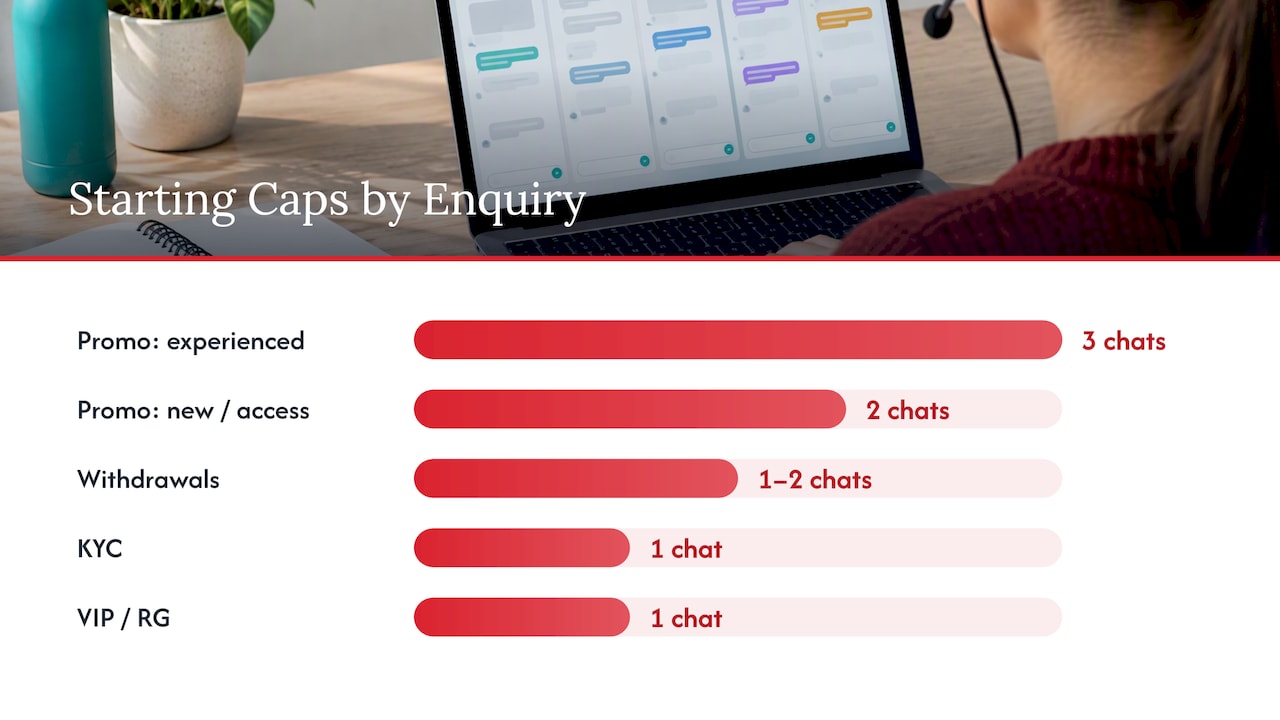
One global cap is the most common mistake. Build a matrix instead. Zendesk’s guidance treats complexity as a routing decision: straightforward chats suit concurrency, while complex, time-consuming issues should move to a less concurrent channel such as phone or tickets.
Here is a working matrix for a casino and sportsbook queue. The caps are our suggested starting points, built from the ranges above, and you should tune them with your own data.
| Enquiry type | Suggested starting cap | Why |
|---|---|---|
| Promo and bonus terms, game rules, app help | 3 (experienced agents), 2 (new) | Short, scripted-friendly, low risk |
| Account access, basic verification status | 2 | Needs careful data handling |
| Withdrawals and payment issues | 1 to 2 | High emotion, multiple lookups |
| KYC document problems | 1, or move to ticket | Sensitive data, slow back-and-forth |
| VIP and high-value players | 1 | Relationship matters more than throughput |
| Responsible gambling signals, complaints | 1, then escalate | Compliance duty, see below |
The last two rows are not about efficiency. They are about what a distracted reply costs you. For VIPs, see how a dedicated VIP player support desk differs from the general queue. For anything that drags on, the ticket route in our comparison of live chat and email support for iGaming shows when to move a conversation out of chat.
Adjust by agent, not just by queue
The WhosOn guide says there is no universal setting: it should reflect agent skill and experience as well as enquiry complexity. Comm100’s 2023 benchmark report reaches a similar conclusion, recommending individual concurrency limits based on skill and experience, after finding that agents handled 43% more chats per month in 2022 than in 2021 and linking higher workload to poorer support and lower CSAT.
A simple tier model works:
- Week 1 to 4 (new agent): cap at 1, then 2 once QA scores are stable.
- Established agent: cap at 2, with 3 allowed on the simple-query skill group only.
- Senior agent or team lead: cap at 2, with time reserved for coaching and escalations.
Review each agent’s cap monthly against their own numbers.
A worked staffing example
The figures below are illustrative, not client data. They show why a modest concurrency increase changes staffing more than most teams expect, and why the efficiency penalty must be in the model.
Suppose a peak hour brings 120 chats, with an average handling time of 8 minutes at concurrency 1.
- Concurrency 1: 120 × 8 = 960 agent-minutes, or 16 agent-hours of work. At an 80 to 85% utilization ceiling, that is roughly 19 to 20 agents on shift.
- Concurrency 2 with a 10 to 25% handling-time penalty: each chat takes 8.8 to 10 minutes of elapsed time, but two run in parallel. Work is 120 × 8.8 to 10 ÷ 2 = 528 to 600 agent-minutes, or 8.8 to 10 agent-hours. At the same ceiling, that is roughly 11 to 13 agents.
The saving is real, around a third fewer agents, but it is not the 50% the naive maths suggests. If you plan on the naive figure, you will be short every busy hour, and wait times will punish you.
Two cautions when you build this model. First, use your own handling times, split by enquiry type. Second, remember that the utilization ceiling applies to concurrent chat work too: a team that always sits at its cap has no slack for a spike. If you need the inputs to forecast per interval, our guide to scaling support without 50 new hires walks through the staffing side.
Signs that concurrency is set too high
You do not need a research project to spot overload. Cobbai lists the symptoms: longer pauses between replies, more reliance on templated answers, and rising escalation rates. In iGaming, add three of your own:
- More repeat contacts on the same withdrawal or verification case.
- QA scorecards showing missed identity or account checks.
- Agents answering the first question in a chat and missing the second.
When two of these appear together, lower the cap for that queue before you change anything else.
The KPIs that show whether your strategy works
No single number proves a concurrency setting is right. Read a small set together. Zendesk’s iGaming peak-time guidance names service levels, occupancy rates, average handling time and backlog age as the measures for dynamic staffing adjustments. The Zendesk chat analytics documentation adds completion rate, non-completed chats, average wait time, average reply time, no-reply time, chat duration, engagement satisfaction and agent concurrency.
Zoho’s live-chat KPI guidance gives the interpretation rule that matters: judge chats per agent alongside handling time, first-contact resolution and CSAT. High chats per agent with poor resolution or CSAT can indicate overload, and a low figure may indicate under-utilization.
A compact dashboard for a head of player support:
- Average and maximum concurrency by interval, so you see peaks, not daily blends.
- Average reply time and no-reply time, the earliest warning of overload.
- First-contact resolution and CSAT, by concurrency level where your tool allows it.
- Escalation rate to second line, which rises when first-line agents are stretched.
- Backlog age and abandonment, which show whether the cap is too low.
- QA score by concurrency band, the cleanest test of whether quality survives.
Put the cap in your SLA language. Our SLA checklist for iGaming player support covers how to write response and resolution targets so they hold up at peak.
Planning for peaks: jackpots, fixtures and promo spikes
Concurrency is a steady-state tool. Spikes need a different plan, because you cannot ask agents to jump from 2 chats to 6 without paying for it in quality.
A UK and Ireland sports betting case study from Sabio describes interaction volumes surging by 400 to 500% within minutes during major sporting events, often lasting 15 to 20 minutes. A surge that short and that steep is too fast for a forecast to catch by hours. Plan it in layers:
- Forecast the known events. Fixtures, finals, tournament kick-offs, scheduled promos and jackpot campaigns are on a calendar. Forecast accuracy matters: a Verint case study describes a global operator improving forecast accuracy by 50%, from plus or minus 10% variation to a 5% target.
- Pre-roster a flex pool. Agents trained on the simple-query skill group can be pulled in for the first 20 minutes without full onboarding.
- Change the front door, not only the cap. Show a pre-chat menu, surface self-serve answers for the five most common event questions, and push non-urgent items to tickets.
- Protect the sensitive queues. Keep payments, KYC and responsible gambling at their low caps even while simple chats flex upward.
- Set a ceiling and a trigger. Decide in advance the backlog age at which you raise the simple-query cap by one, and the point at which you drop it again.
The operational detail for tournament periods is in our pieces on why support fails during the World Cup and our World Cup support coverage. For round-the-clock rosters, see how follow the sun support fits in.
Language coverage changes the maths
Concurrency limits apply per language queue. A Finnish or German queue with three agents on a night shift cannot flex the way an English queue with thirty can. When a chat is handled by an agent working in a second language, comprehension takes longer, and a cap of 2 can feel like 3. Review real-time language support for EU businesses when you decide which languages justify a dedicated night roster and which can be served by routed overflow, and check language quality with our language QA approach.
Compliance: concurrency in a UK-licensed operation
Speed is not the only constraint. If you hold a UK Gambling Commission licence, agents splitting attention still have to meet customer interaction requirements.
- Under LCCP condition 3.4.3, in force from 12 September 2022, remote operators must have effective systems to monitor customer activity for indicators of harm, including spend, behavior and time spent gambling, and take timely action when risks are identified.
- The Commission’s customer interaction guidance, current guidance issued August 2023 and in effect from 31 October 2023, expects licensees to quality-assure individual interactions by spot-checking records, including chat records, to keep effective interaction records, and to train and support staff in carrying out effective interventions.
- The Betting and Gaming Council’s voluntary code on customer checks says operators may use two-way live chat or phone interactions as part of a risk assessment for customers who meet specific deposit thresholds.
What this means for your concurrency design:
- Make harm-related chats single-threaded. An agent who is mid-intervention should not receive a new chat. Configure the routing tool so that a tagged conversation sets the agent’s capacity to zero.
- Sample QA by concurrency level. Spot-checks should cover chats handled at your highest cap, because that is where interventions are most likely to be missed.
- Keep full chat records. Your QA process depends on complete transcripts and tags.
- Train for the intervention, not just the script. Agents need to recognize signals and know the escalation path.
For teams building the monitoring loop, training quality assurance gates offer a useful way to think about validating whether agent capability meets the standard before you raise a cap. Our player support QA playbook covers scorecards and sampling for licensed operators.
Putting your strategy into practice: a 30-day plan
- Days 1 to 5, baseline. Pull average and maximum concurrency, reply time, FCR, CSAT and escalation rate by interval and enquiry type.
- Days 6 to 10, build the matrix. Set starting caps per enquiry type and per agent tier, using the table above as a draft.
- Days 11 to 15, configure routing. Add skill groups, capacity rules for sensitive tags and overflow to tickets.
- Days 16 to 25, test. Run the new caps on one queue. Compare QA scores and reply gaps against the baseline, not against your hopes.
- Days 26 to 30, decide. Raise a cap by one only where quality and wait time both held. Lower it where they did not. Document the trigger rules for peaks.
Repeat the cycle quarterly, and before every major event.
Our perspective
We run player support teams for licensed operators, and the pattern we see is consistent: concurrency gets set once, in a tool, by whoever configured the platform, and then nobody revisits it until a jackpot drop or a big match exposes it.
Our view is that concurrency is a staffing and quality decision, and it belongs in the same conversation as your SLA, your QA scorecard and your roster. A cap of 3 is not a saving if it costs you escalations, repeat contacts and a missed intervention. A cap of 1 everywhere is not safety if players sit in a queue.
That is why we build dedicated teams around the enquiry mix. Simple queries run at modest concurrency. Payments, KYC and VIP run lower. Second-line agents take what first line should not hold. A written SLA and QA governance keep the numbers honest, and we plan peak capacity ahead of the event rather than asking agents to stretch during it.
If your internal team cannot staff up in time for the next spike, the answer is rarely a higher cap. It is a better-shaped team, launched early.
Miroslav Maslovarić
How Workanova supports a concurrency-based model
We hire, train, equip and launch a named support team for your brand in 4 to 8 weeks, covering live chat, email and ticketing, VIP and retention, KYC and payments, second-line escalation and QA, with 24/7 coverage in 14+ languages and written SLAs. That structure lets you set concurrency per queue and per skill group instead of one number for everyone.
Published pricing starts from €7.15 per hour for a customer support agent and from €16.95 per hour for a manager or team lead, plus a Workanova fee from €400 per month per seat. Second-line support is listed at €1,800 to €3,200 per month per agent. See the pricing page for the current terms, or look at our live chat support service to see how a dedicated chat desk is set up. If you want a review of your current caps and peak plan, start from workanova.com.
FAQ
What is a good chat concurrency for casino and sportsbook support?
Start at two chats per agent. Zendesk’s glossary gives 1 to 2 as the industry standard, and its live-chat guidance recommends 2 to 3. Raise to three only for experienced agents on simple queries, and keep payments, KYC, VIP and harm-related chats at one.
How do I calculate average chat concurrency?
Measure the average number of active chats per agent per hour, as Zendesk defines it, and read it by interval rather than by day. A daily blend hides the peaks where agents sit at their cap. Compare it with the maximum setting in your routing tool.
Does higher concurrency always cut costs?
No. It reduces the agents needed per chat, but each extra chat can add 10 to 25% to effective handling time, according to WFM Labs. If quality drops, repeat contacts, escalations and lower CSAT can cancel the saving. Test any increase against QA scores and reply gaps.
How should concurrency change during a jackpot drop or major match?
Do not rely on caps alone. Pre-roster a flex pool, push non-urgent queries to tickets, and allow a small, pre-agreed rise on simple-query chats only. Keep sensitive queues at their normal limits, and set a trigger for when to lower caps again.
Sources
- Workforce management glossary, Zendesk help
- What Is Chat Concurrency? Chatdrill
- Metrics and attributes for live chat, Zendesk help
- Analyzing your Chat activity, Zendesk help
- The rise of automated web chat and conversational AI in UK contact centres, ContactBabel
- Multi-Channel and Blended Operations, WFM Labs
- Increasing agent concurrency without overwhelming agents, ASAPP
- Chat Concurrency and Quality: How Many Chats per Agent? Cobbai
- How to interact with customers on live chat, Zendesk
- A best practice guide to managing concurrent chat sessions, WhosOn
- Live Chat Benchmark Report 2023, Comm100
- iGaming customer support strategies for high-demand moments, Zendesk
- Top live chat metrics and KPIs, Zoho SalesIQ
- Betting On: UK sports betting and iGaming workforce management, Sabio
- Global sports betting and iGaming firm case study, Verint
- LCCP condition 3.4.3, remote customer interaction, UK Gambling Commission
- Customer interaction guidance for remote gambling licensees, UK Gambling Commission
- Voluntary Industry Code on Customer Checks, Betting and Gaming Council
- Training quality assurance gates, Cognistry
- Real-time language support for EU businesses, Glocco
Recommended